Beyond the Menu Tree: How Yelp Built a Smarter Customer Success Chatbot with AI

-
Lina Lee, Machine Learning Engineer; Nelson Lee, Engineering Manager
- May 27, 2026
The Evolution of Support: From Fixed Phrases to Conversation
At Yelp, delivering responsive and accurate customer support is a core priority. For years, our legacy Customer Success (CS) Chatbot provided support by guiding users through a static support experience. Users either navigated a 2-step menu tree or typed a query that was matched against a fixed set of phrases to retrieve an answer.
While functional, the legacy chatbot had a key limitation: its reliance on rigid matching meant that if a query didn’t fit the menu structure or precisely match a known phrase, the user wouldn’t be able to get the right answer. It was clear we needed a more dynamic and intelligent system to handle the sheer diversity of user inquiries.
To address this, we connected Yelp’s internal knowledge base to a Large Language Model (LLM) using a Retrieval Augmented Generation (RAG) pipeline. This setup allows us to leverage advanced LLM services provided by third-party vendors and enrich chatbot responses with up-to-date, company-specific information. RAG allows the LLM to ground its responses in specific, external knowledge that is not available to the LLM during model training to ensure answers are not only natural but also accurate and contextually relevant.
In the following sections, we will walk through the design of this system:
- Structuring Intelligence: How we route queries into specialized workflows (like Question/Answering, Refund, and Billing).
- Deep Dive: The technical architecture of our RAG pipeline, focusing on how we built a lean and accurate vectorstore using metadata.
Structuring Intelligence: The Chatbot with Specialized Workflows
We realized that a single conversational model could struggle to handle the large volume and diverse nature of inbound customer requests. To manage this complexity efficiently and ensure proper guidance for specific actions (e.g. refunds), we designed the new LLM-Assisted CS Chatbot to route queries into five distinct, specialized workflows. We bucketed the workflows based on the frequency of inbound requests along with the potential risks of the queries (e.g. churn risk, legal risk, and financial risk). When a user submits a query, the system uses the LLM to intelligently detect which workflow the query should follow.
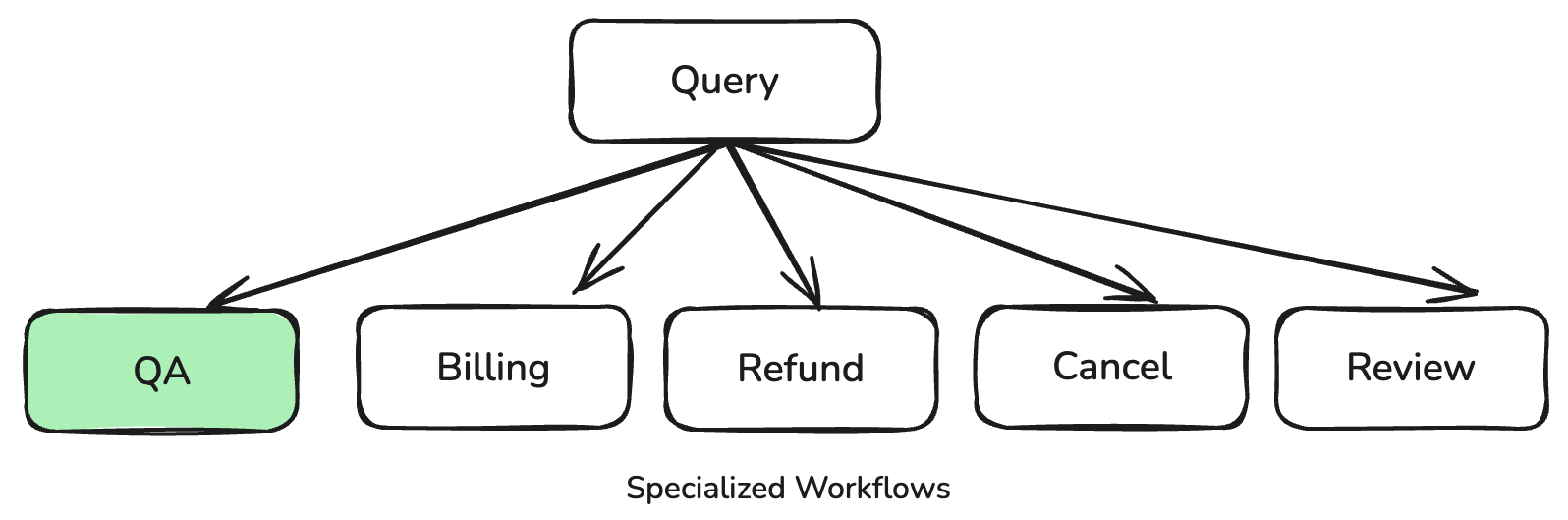
The workflows are:
- Question/Answering (QA): The default workflow, which utilizes RAG for general questions.
- Billing: Shows current billing details, such as subscribed services and promotional balances.
- Refund: Guides users through the steps to submit a refund request form.
- Cancel: Shows templated response due to high financial/legal risk.
- Review: Shows templated response due to high financial/legal risk.
The RAG Pipeline for QA
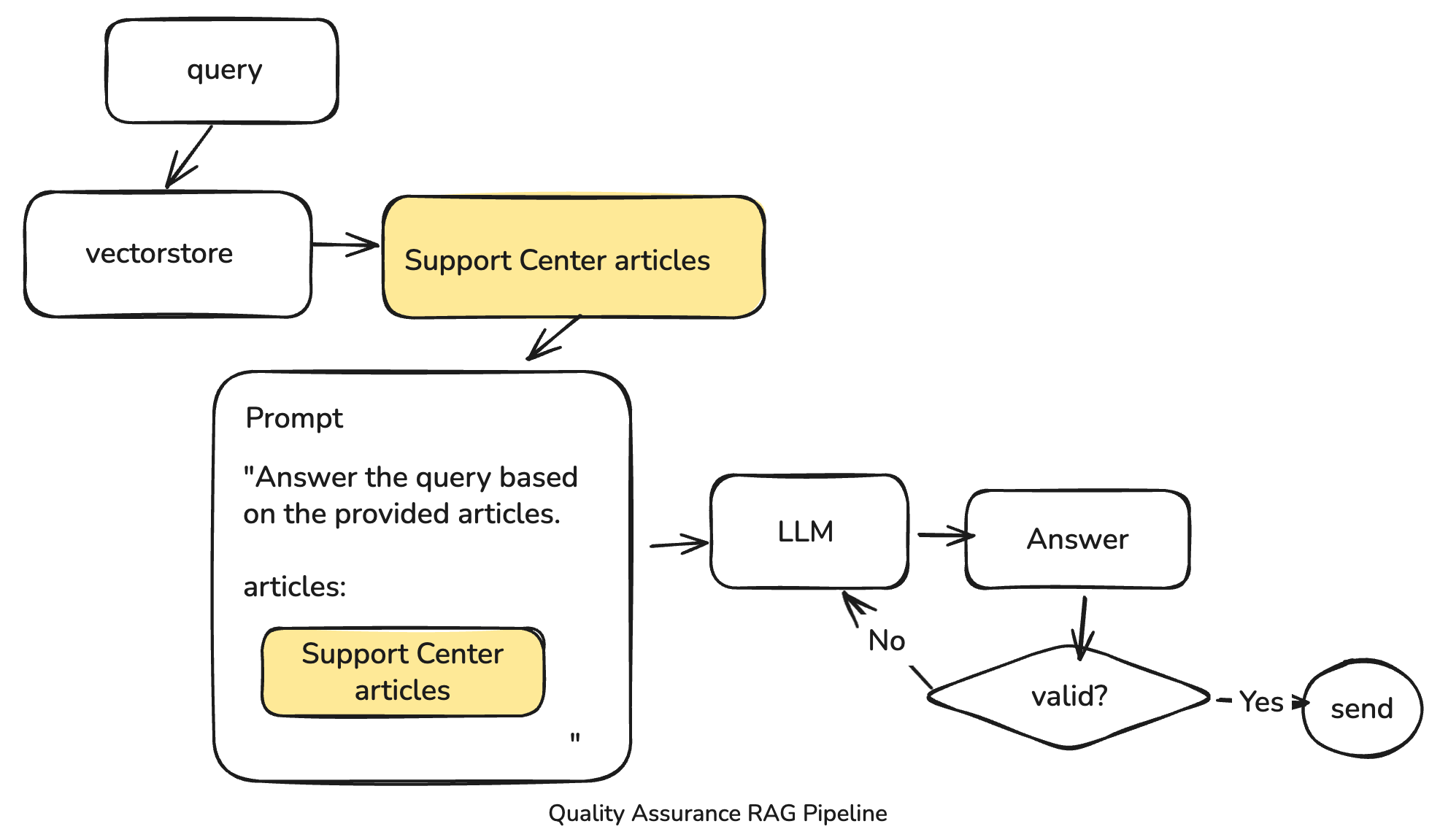
The QA workflow is where RAG shines. The process involves several rigorous steps to ensure a high-quality, trustworthy response:
- The user’s query is processed and compared against our specialized vectorstore.
- The system retrieves top-matching Support Center articles based on semantic similarity.
- These articles are embedded directly into a prompt for the LLM, instructing it to generate an answer only based on the provided context.
- The generated answer undergoes several validation checks, including trust & safety checks, valid URL checks, and character limit checks, before being returned to the user.
Deep Dive: Building a Lean and Accurate RAG Pipeline
The foundation of our RAG system rests on approximately 370 Support Center articles. Since each article is relatively concise and addresses a specific question, we made a crucial architectural decision: we use whole articles for RAG, rather than splitting them into smaller chunks. Our focus became efficiently finding the right article for the query.
Metadata Over Content
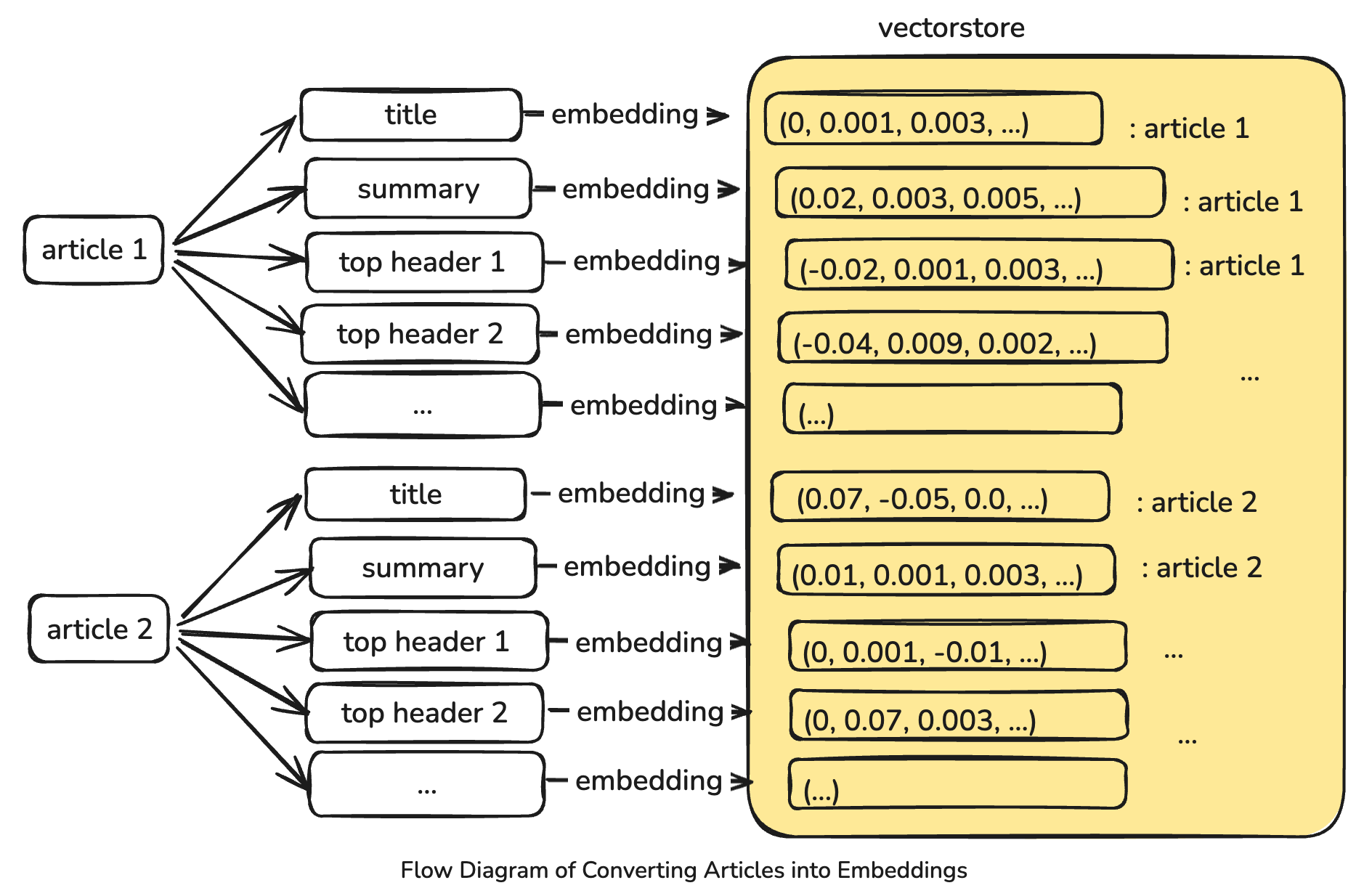
To achieve efficient and accurate retrieval, we constructed our vectorstore using only the metadata associated with the Support Center articles. This metadata includes the title, summary, and top headers from each article, along with a subset of historical intents/responses from the legacy chatbot. Crucially, each of these components (the title, the summary, and each distinct top header etc.) is treated as a separate text input and individually embedded into the vectorstore. This method allows us to capture the distinct semantic signal from these concise segments, which was found to be more effective than embedding larger texts.
This approach was informed by early experimentation. We discovered that embedding large texts, such as entire articles or long paragraphs, can dilute the information signal, often leading to less accurate semantic matching. Concatenating too much text was observed to cause the semantic distances between vectors to get “farther apart” in the embedding space because the key phrase we wanted to detect was mixed with too many unrelated words. For instance, comparing a user’s query “reset password” against a vector representing an entire 500-word article on account management (which only mentions “reset password” once) yields a poor match score because the signal is diluted. We also experimented with splitting the text into smaller chunks such as short paragraphs or sentences, which didn’t perform well for our use case either since it may have resulted in too many false candidates. By focusing on concise metadata, we ensure maximum semantic similarity capture during the search phase.
We use Text-embedding-ada-002 to construct our vectorstore. Each individual text segment derived from the metadata is converted into a 1536-dimension unit vector. The entire vectorstore is highly compact, measuring around 8 megabytes. This small footprint allows us to load the vectorstore directly into memory for lightning-fast retrieval when serving the chatbot.
Searching with Speed and Precision
When a query arrives, it is converted into a vector with the same embedding model and used for a similarity search. We utilize FAISS search for smart indexing and quantization to quickly find the closest vectors to the query.
We then intend to retrieve the top five articles to pass along to the LLM as context. To achieve this, we first find the k closest matches vectors, where k is based on the maximum number of items per article (title + summary + # of headers etc) times five. We then refine this list by applying an empirically determined threshold to filter out any resulting article that is not sufficiently similar to the query. Finally, we select the top five unique articles from the remaining candidates. This process ensures that the final selected list of top matching articles will be at most five.
This retrieval methodology achieves robust results, demonstrating an impressive ~94% recall@5 on our evaluation dataset.
Keeping the Knowledge Fresh: The Daily Update Pipeline
Since our Support Center articles are frequently updated, maintaining a current knowledge base is critical. We established an automated daily update pipeline using a scheduled batch job:
- Fetching and Processing: The job fetches updated articles from an internal endpoint. It converts the articles to markdown format, extracts the necessary headers, and constructs a CSV file containing all the candidate text and metadata.
- Storage: This generated CSV file is uploaded to AWS S3 daily.
- Loading: When the chatbot’s container starts, it downloads the latest CSV from S3. The vectorstore, including the construction of the index and calculation of fresh embeddings for the newly fetched articles and metadata, is then dynamically loaded into memory during the health check process, ensuring the system operates with the freshest information.
Mitigating Unexpected Challenges
The development of the LLM-Assisted Chatbot presented specific challenges, particularly concerning the reliability of the generated responses.
One of the most notable unexpected challenges was the tendency of Large Language Models (LLMs) to hallucinate hyperlinks frequently. Since our knowledge base articles contain numerous hyperlinks, and we intended for the LLM-generated responses to include accurate links, this required a dedicated solution. To counteract this, we developed a process to reliably retrieve valid hyperlinks from the source articles and integrated specific validation checks. This verification process ensures that any link included in the final response genuinely originates from one of the retrieved Support Center articles and is not invented by the LLM.
Future Horizons: Continuous Improvement
The development of the LLM-Assisted CS Chatbot is an ongoing project. We are actively exploring several improvements to enhance its performance and coverage:
- Dataset Expansion: We plan to expand our evaluation dataset with more query examples to further improve the model’s robustness.
- Keyword Experimentation: We will experiment with using article keywords—a feature recently made available through the internal endpoint—to improve the accuracy of the article retrieval process. While we don’t know if this will drastically improve performance, we are keen to test its utility.
- Adding More Documents: We plan to enrich the knowledge base by incorporating additional documents, such as internal business owner support articles, a business glossary page, and even the chat transcripts with human support agents.
- Optimizing Context: We observed in testing that increasing the number of retrieved articles may lead to a slight performance improvement. We can further search for the “sweet spot”—the optimal number of articles that provides rich context without confusing the LLM or diluting the signal.
Conclusion
The transition from the legacy chatbot to our LLM-Assisted CS Chatbot, powered by Retrieval Augmented Generation (RAG), represents a significant milestone for Yelp Customer Success. By transforming a rigid, rule-based system into a dynamic, conversational agent, we doubled the chatbot resolution rate based on the A/B test result. This project lays critical groundwork for harnessing advanced AI technologies across Yelp, driving efficiency, and setting a new standard for intelligent customer engagement.
Acknowledgements
This ambitious project was a major collaborative success. A huge shoutout goes to the entire Customer & Sales Intelligence Team and our product partners.
We also deeply appreciate the collaborative support from other vital teams, including but not limited to Biz Customer Experience, Sales Infrastructure, and Web Foundation, who made this project possible.
Become a Software Engineer at Yelp
We work on a lot of cool projects at Yelp. If you're interested, apply!
View Job