Zero-Copy Migration: How Yelp Moved Its Cassandra Fleet Between Kubernetes Clusters
-
Ilkin Mammadzada and Max Falk, Site Reliability Engineers
- Nov 9, 2026
Introduction
How do you move a large Cassandra fleet of around 1000 Kubernetes Pods and a petabyte of data across Kubernetes clusters without anyone noticing?
Apache Cassandra powers many of Yelp’s core features, from user profiles to ads and search. We run it on Kubernetes, orchestrated by a custom operator covered in our earlier blog post. When Yelp migrated its Kubernetes control plane to Amazon EKS, most workloads moved over seamlessly, but Cassandra was left behind on our legacy self-managed clusters alongside its persistent EBS-backed storage.
The conventional way to move Cassandra between clusters is to stream the data: add new nodes, replicate data, decommission the old ones. But for our largest clusters, streaming alone could take weeks. We wanted something faster. In this post, we describe how we migrated our Cassandra fleet to EKS by moving disks instead of data, with no downtime and no added cost.
Why We Had to Move
A few years ago, we celebrated a significant infrastructure milestone: we successfully moved our Apache Cassandra fleet from standard EC2 instances into Kubernetes. By building a custom operator, we completely transformed how we orchestrated and managed one of Yelp’s most critical datastores, allowing us to automate away a lot of manual toil. At the time, it was a huge win.
But in the world of infrastructure, the only constant is migration! Fast forward a bit, and we realized our self-managed Kubernetes control planes had become a heavy burden. Instead of improving the systems, our engineers were constantly fighting fires: spending days at a time just trying to keep the heavy control plane and etcd nodes from tipping over. On top of the engineering toll, it was also quite costly for the hardware to run the control plane on our largest cluster, a massive environment supporting thousands of nodes. To escape this cycle, we made the call to migrate our Kubernetes control planes to Amazon EKS. By moving to a managed service, we could hand the operational burden over to AWS, also gaining zero-downtime upgrades and a guaranteed uptime for just a fraction of our previous hardware costs.
For the majority of our development teams, this massive migration was invisible. Yelp uses an internal platform-as-a-service layer called PaaSTA, which acts as an extra abstraction layer for deploying applications. To move our stateless services, we simply updated the PaaSTA configurations to point to EKS instead of the legacy clusters. Just like that, stateless workloads began seamlessly floating over to their new home.
But then there was Cassandra. As you can imagine, moving stateful workloads isn’t nearly as simple. Kubernetes does not offer a magic button or an easy, built-in way to migrate StatefulSets and their underlying persistent volumes across completely different clusters. So, while our stateless apps were happily running on EKS, our massive Cassandra fleet was left stranded on legacy self-managed clusters. We had thousands of pods and nearly a petabyte of data anchoring us to the expensive infrastructure we desperately wanted to turn off. We needed to find a way to bring Cassandra along for the ride.
Choosing a Migration Approach
We knew moving a massive, live database fleet wasn’t going to be a walk in the park. Before writing any code, we sat down and brainstormed every possible way to get our Cassandra workloads over to EKS. We eventually narrowed it down to four main strategies:
- Scale up new Cassandra, then scale down old ones (The native Cassandra approach): We would take the traditional method of adding new, empty nodes in EKS, streaming the data over the network to them, and then safely decommissioning the old nodes
- Failover & Shutting down a Region: We would failover all our traffic to one region, shut down the inactive region entirely, rebuild it in EKS, and then flip the traffic back.
- Create a new Cassandra datacenter in EKS: We would spin up a completely new Cassandra datacenter inside EKS, rebuild the keyspaces from scratch, seamlessly switch customer traffic over, and finally delete the old datacenter.
- The Rolling Persistent Volume (PV) Transplant: Instead of moving the data over the network, we would simply detach the underlying storage disks from the old cluster and attach them directly to the new EKS cluster
Initially, the Data Infrastructure team actually assumed this Kubernetes-native approach would be far too complex and risky. But last year, our Compute Infrastructure team had successfully migrated our Kubernetes storage plugins to the Container Storage Interface (CSI). That project gave us a deep, hands-on understanding of how Kubernetes handles storage under the hood. That experience completely changed our minds. What initially seemed like a high-risk migration became a low-effort path we felt totally confident taking.
| Approach | Development Effort | Migration Duration | Reliability Risk | Transparency to Customers | Compute Cost |
|---|---|---|---|---|---|
| 1. Scale up/Scale down | Low | High | Low | Yes | High |
| 2. Failover / Shutdown Region | Medium | High | High | No | Low |
| 3. New DC in EKS | Low | Medium | Medium | No | High |
| 4. The Rolling PV Transplant | Low | Medium | Low | Yes | Low |
A breakdown of the characteristics of each considered option.
Looking at the board, the choice became a no-brainer: we went with Approach 4 (The Rolling PV Transplant).
The traditional “scale up and stream” Cassandra approach would have forced us to temporarily double our compute capacity and pay massive data transfer costs. Plus, for our largest clusters, streaming tons of data over the network could take weeks.
Instead, our decision was driven by a key “aha!” moment: Amazon EBS volumes are bound to an Availability Zone (AZ), not to a specific Kubernetes cluster. In Kubernetes, a PV is really just a simple pointer to an underlying storage disk. We realized that if we could just create the PV in the new EKS cluster to point to the exact same EBS volume ID used in the old cluster, the data would “move” instantly without streaming a single byte. By moving the disks instead of the data, we were able to migrate quickly and our customers didn’t experience any downtime.
How The Rolling PV Transplant Migration works
Imagine moving a busy 24/7 customer support team to a new office building without ever putting callers on hold. You tap one agent at a time on the shoulder when they are not on a current call, have them pack up their specific filing cabinet (the EBS volume), walk across the street, and plug their phone back in. The remaining agents simply absorb the call volume while that one person is in transit. That is essentially what we had to do: move live database nodes across entirely different Kubernetes control planes without dropping a single customer request.
-
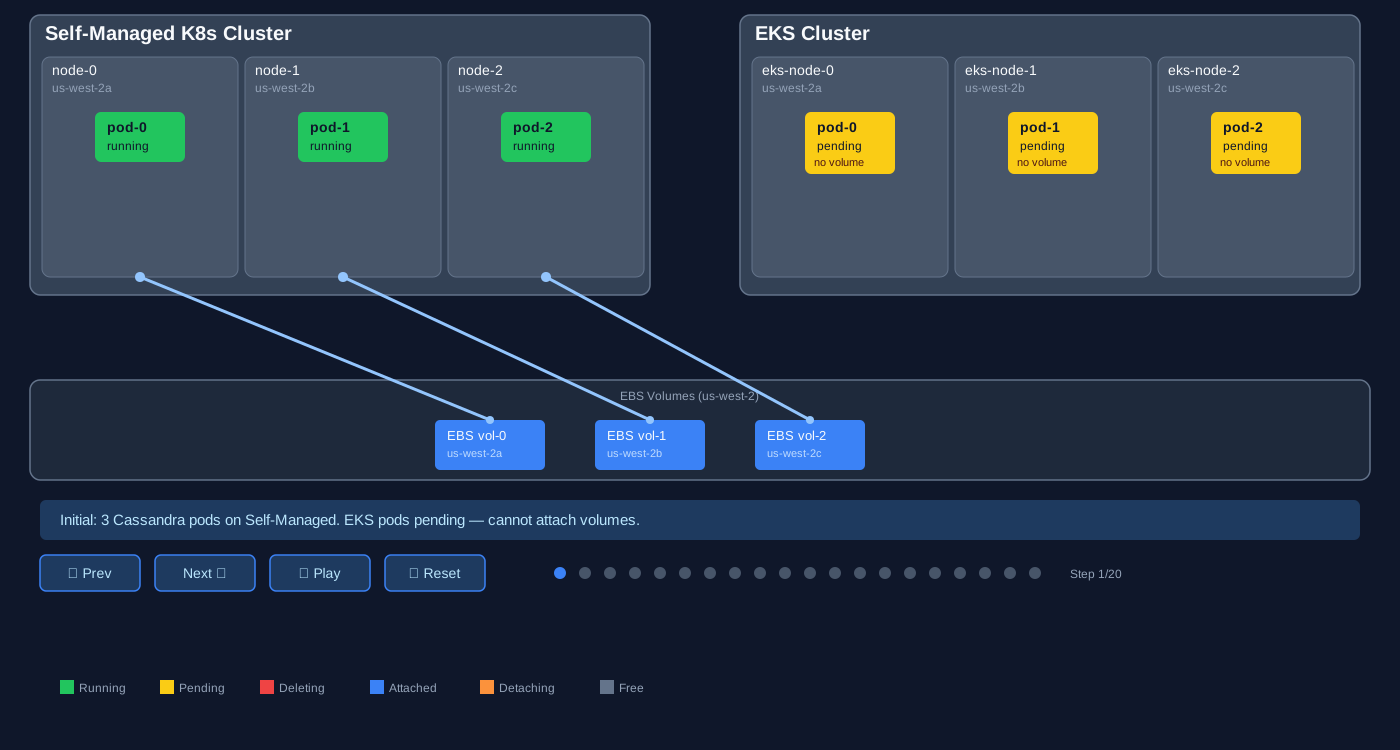
Pre-warm the EKS cluster: We create the exact same Persistent Volumes (PVs) and Persistent Volume Claims (PVCs) in the new EKS cluster, hardcoding them to point to the existing Amazon EBS volume IDs. We’ll need to patch PVs to add reference (
claimRef) of recently created PVCs. -
Spin up the identical StatefulSet: We create an identical StatefulSet in the EKS cluster. The EKS cluster immediately spins up
pod-0. However, because an EBS volume can only be attached to one EC2 instance at a time,pod-0gets stuck in aContainerCreatingstate. -
Cut the cord on the legacy cluster: We delete
pod-0on the old, self-managed Kubernetes cluster. - The handoff: Once the old pod terminates, Kubernetes automatically detaches the EBS volume from the legacy node. But we need to prevent the pod from rescheduling again, otherwise EBS won’t be detached at all.
-
A new home: The moment the volume is freed, the waiting EKS cluster swoops in, attaches the volume to the new node, and boots up
pod-0. - Rinse and repeat: Cassandra pod starts up in EKS, discovers it is on the exact same network with the exact same data and token range, and happily rejoins the ring. We then repeat this process for the next pod in the sequence.
Migration Pseudocode
To give you an immediate sense of the magic trick, here is the pseudocode of the automation we eventually wrote to orchestrate this dance:
# Phase 1: Setup
pause_cassandra_repairs(cluster)
export_pvs_and_pvcs(source_cluster, dest_cluster)
set_pv_reclaim_policy(source_cluster, "Retain") # Don't delete our disks!
# Create identical StatefulSet in EKS
# Note: Pods will be stuck in 'ContainerCreating' waiting for their volumes
apply_statefulset(dest_cluster, podManagementPolicy="Parallel")
# Pause the Cassandra Operators to prevent interference
patch_cr_skip_reconciliation(source_cluster, dest_cluster, True)

# Phase 2: The Rolling Migration
for pod in pods:
    # checking health with nodetool
    wait_for_cluster_health(UN_count == replicas)

    # The handoff
    delete_pod(source_cluster, pod.name)
    avoid_pod_rescheduling(source_cluster, pod)
    wait_for_volume_detach(source_cluster, pod.volume)

    # EKS pod automatically claims the newly freed volume
    wait_for_pod_ready(dest_cluster, pod.name)
    wait_for_cassandra_to_rejoin_ring(pod.name)

# Phase 3: Finalize
patch_cr_skip_reconciliation(dest_cluster, False)
delete_old_statefulset(source_cluster)
Why This Means Zero Downtime
If deleting a live database pod sounds terrifying, remember that Cassandra was built for exactly this kind of chaos. Because of Cassandra’s replication factor, temporarily losing a single node is considered a normal, everyday operational event. While the EBS volume is being detached and reattached (which usually takes just a few minutes), the rest of the Cassandra ring continues serving customer reads and writes without skipping a beat. When the migrated pod wakes up in EKS, it simply catches up on any writes it missed while it was offline.
The Operator Coordination Problem
There was one massive wrinkle we had to iron out. Yelp uses a custom-built Kubernetes operator to manage Cassandra. By migrating across clusters, we suddenly had two operators: one in the legacy cluster and one in EKS which managed the exact same logical database ring. If both operators tried to reconcile the cluster at the same time, they would constantly fight over the state of the pods. To solve this coordination problem, we utilized Kubernetes’ optimistic concurrency and a neat operator trick: we patched our Custom Resources with a skipReconciliation: true flag on both clusters during the migration. This effectively put both operators to sleep for that specific Cassandra cluster, allowing our migration script to manually orchestrate the delicate handoff without the operators trying to “fix” the missing pods. Once the migration was completely finished, we simply woke the EKS operator back up.
Step-by-step migration of Cassandra pods and their EBS volumes to EKS within each Availability Zone. Use the controls to step through or play the migration.
Open the interactive diagram at full size.
Getting It Done
We broke execution into three phases:
Manual validation in dev (1 week). Several engineers ran the procedure by hand, cluster by cluster, in our development environment. Each manual run uncovered edge cases — stale VolumeAttachment objects, config references that assumed the legacy cluster naming convention, services that connected via hardcoded names rather than the service mesh. By the time we had migrated half of dev, we had a decent catalog of what could go wrong.
Automation (1 week). A single pod migration touches more systems than you might expect: two PRs to our GitOps repository (one to prepare the EKS-side resources, one to finalize), auth against two Kubernetes environments, Cassandra repair management via Reaper, nodetool health checks, alert suppression, and graceful error handling at each step — plus the same in reverse for rollback.
Writing this automation by hand would have been its own multi-week project. But the manual phase had given us something valuable: a precise, battle-tested specification. Every step, every error path, every edge case was documented from real runs. That turned out to be the ideal input for an LLM. We fed our validated runbook to Claude and had it generate the orchestration script — roughly 800 lines of bash coordinating kubectl, the AWS CLI, and our internal tooling. The key insight was sequencing: we did not ask an LLM to design the migration procedure. We ran it by hand until we understood every failure mode, then used the LLM to turn a known-good procedure into code. The script needed only minor adjustments after two days of testing against the remaining dev clusters.
Production rollout (3 weeks). By this point, running a migration was routine: merge the prep PR, start the script, monitor Grafana, merge the finalized PR. On a typical day we migrated 3–6 clusters across both regions. The largest single cluster (user-data-store, 54 pods) took about 12 hours end-to-end. The source of truth for what had been migrated was always our GitOps repository — if a cluster’s config pointed to EKS, it was done.
What Went Wrong
Of course, we hit a few surprises along the way:
The phantom attachment problem. The one issue specific to this migration technique: after deleting a pod on the legacy cluster, the AWS CSI controller sometimes did not clean up the Kubernetes VolumeAttachment object. The physical EBS volume was fully detached from the old EC2 instance (AWS knew it was free) but Kubernetes still believed it was in use. The EKS pod would sit in Pending indefinitely, waiting for a volume that was already available. This happened on roughly 5% of pod migrations. The fix was simple: delete the stale VolumeAttachment object on the legacy cluster. But the failure was silent. Without explicit timeout detection in the script, we would have stared at a stuck pod wondering why. Anyone attempting this technique should build a “volume freed but pod still waiting” check into their automation.
Broken backups. Just 48 hours after our first production clusters landed in EKS, our Cassandra backup jobs began throwing AccessDenied IAM errors. The culprit was a classic migration mismatch: the IAM role configuration had diverged, spawning a new -eks suffixed role that the scheduled jobs run by Tron, our in-house scheduler, weren’t yet assuming. The technical fix was a trivial one-line Terraform update but the real issue was observability. Our monitoring was configured to only file Jira tickets for backup failures rather than paging an engineer, leaving us flying blind for two days. We’ve since upgraded these alerts to page-level severity to ensure backups don’t fail silently.
Migrations are audits. The most interesting surprise had nothing to do with the migration mechanism itself. Our script pauses Cassandra Reaper repairs before each move and resumes them afterwards. For one cluster, repairs had been disabled for three months due to an unrelated incident nobody had noticed. Re-enabling them revealed significant data inconsistencies that had been silently accumulating across nodes. The migration did not cause this but it surfaced it. Touching every node in every cluster is also a health check of your entire fleet. We found broken repairs, stale configurations, and orphaned resources that would have kept growing undetected.
Because we never decommissioned any node from the Cassandra ring, reversing a migration was the same operation in the other direction: swap the source and target arguments. We exercised this a handful of times. Once when a cluster had subnet definitions not yet configured in EKS. Once for a certificate mismatch. In each case, the pod was back in its original cluster within minutes. This is why we chose this approach over streaming. With streaming, rollback means streaming back. With pointer swaps, rollback is another pointer swap.
Results
Infrastructure migrations should be boring. If nobody notices, you did it right.
Once the automation was in place, one engineer could handle the full production Cassandra-to-EKS migration in about three weeks. The manual steps were pretty minimal: merge PRs, trigger the script (parallel runs helped), and do a final health check.
The numbers:
-
~90 production clusters, ~1000 pods
-
~1000 TiB of data moved (by pointer, not by wire)
-
Zero customer-facing downtime
-
Zero data loss
-
Largest single cluster migrated in ~12 hours end-to-end
Cassandra was the last major workload holding us to this legacy infrastructure. Getting here was a multi-year effort across many teams: the initial EKS migration of stateless workloads, the CSI plugin work that made volume detach-attach possible, and finally migrating all stateful workloads (Flink, Kafka, Cassandra) off the legacy clusters.
With the legacy clusters retired, we’re saving quite a lot of infra costs and have deleted a bunch of management code that nobody will miss.
The Rolling PV Transplant approach is viable for any AZ-pinned stateful workload on Kubernetes. We also used it for Kafka clusters on the same legacy infrastructure. If you’re staring down a cross-cluster migration of stateful workloads, check what actually binds data to the cluster. For us it was nothing more than a volume ID in a YAML file.
Acknowledgements
Getting the last remaining workload, Cassandra, off our legacy infrastructure depended on years of groundwork across teams. Thanks to Compute Infrastructure for the CSI foundations and previous EKS migrations; Database Reliability Engineering for Cassandra ownership, migration guidance, and operational support; Production Tooling for the migration automation and legacy cluster decommissioning; and Streaming for the Flink and Kafka migration work.
Become a Software Engineer at Yelp
Want to help us make even better tools for our full stack engineers?
View Job