Optimizing Our Build Times by Migrating from Webpack to Rspack

-
Benson Pan, Software Engineer
- May 20, 2026
Over the years, Webpack has remained the bundler of choice for many JS projects, including here at Yelp. While it has served us well, its speed has increasingly become a bottleneck as our monorepo continues to grow. Fortunately, a bunch of new build tools (Vite, Parcel, Rspack, etc.) have emerged in recent years. Each of these tools promises different ways of improving performance and developer experience. In this blog post, we’ll walk through how we migrated our monorepo builds from Webpack to Rspack and achieved an approximately 50% reduction in build time.
Why Rspack
Our team has been closely observing all the different bundlers as they developed and gained community adoption. We were eager to experience the performance gains, but we also greatly value stability.
As such, we’ve spent time throughout the life of our monorepo speeding up builds as our codebase has grown (e.g. we optimized our alias usage, explored CI caching, etc.). However, we’ve realized that further gains may require more substantial investment.
One feature of Rspack that was particularly enticing was its emphasis on Webpack compatibility. By comparison, bundlers like Vite, which use a completely bespoke config, would require additional migration work. With the years of tooling built on top of Webpack, replicating the various intricacies of our build configuration in an entirely different bundler would be difficult.
On the other hand, our team already has familiarity with the configuration options Webpack offers. Rspack in theory should offer an easier migration and function with fewer surprises.
Migrating to Rspack
Rspack offers a very comprehensive Webpack migration guide, which is a great starting point. In addition to Webpack’s built-in plugins and some community plugins, we have a few custom Webpack plugins that needed to be Rspack-compatible. Fortunately, instead of a re-write this only involved updating some Webpack API calls with the Rspack-compatible equivalents (e.g. some values in compilation.entrypoints are under a different path).
When it came to configuring Rspack, we took a more careful approach. Our team knew that we wanted to have a staged rollout so teams could take time to verify their updated bundles. This approach reduced the burden of migration so we could debug build issues without rollback concerns and allow other teams to verify independently without a long-standing PR. A staged rollout was made a lot more manageable with our monorepo structure, compared to multi-repo setups. From the granular per-page changes to the larger monorepo-wide switchover, we completed the process without the months-long migration typically required in multi-repo setups. In contrast, the monorepo migration could be completed in a single PR once the pages had been validated.
A staged rollout also means we’d be keeping around our original Webpack configs for some time. As such, we took an “adapter approach” to create our Rspack config and to preserve our existing configuration.
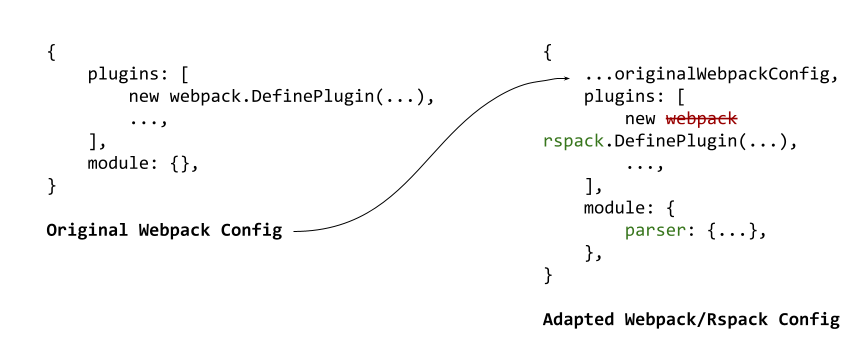
A code snippet illustrating the adapter code pattern
The adapter first copies over our original Webpack config. The vast majority of Webpack configuration values are compatible with Rspack. The remaining changes are made by replacing specific values/plugins with Rspack-compatible values. Arranging our config this way means that our original configuration remains untouched, guaranteeing we preserve our existing options. It also means that any update made by the adapter is explicit and we can see how it differs from the original configuration.
Once we had our configuration working, our migration strategy was to allow developers to opt-in to Rspack for their dev tools and opt-in to bundling their pages with Rspack on CI. This gradual adoption allowed us to validate our changes beyond a few test pages. Here, we also leaned heavily on deployment previews to easily verify pages in production as well. After completing verification of several key pages, we completed the migration by moving to Rspack by default.
Optimizations
With the core migration complete, we turned our attention to several optimization opportunities that amplified our performance gains. This migration alone sped up our full server-side rendering builds by approximately 25%!
Barrel Files
Barrel files (often index.js files) are commonly used in many codebases to clean up imports and rename dependencies. However, barrel files have been associated with performance issues because bundlers must process/resolve all re-exported modules, even if only a few are used.

A code snippet illustrating export patterns
A few modern bundlers now optimize for this, but a particularly troublesome pattern is star re-exports shown above. The Rspack lazy barrel docs also explicitly mention that star re-exports are not optimized either. Upon creating a codemod that converts our star re-exports to named re-exports, we noticed another substantial performance improvement, shaving additional time off our builds.
A more subtle variant involves files that import and immediately re-export values (e.g. import { foo } from "bar"; export { foo }) rather than using true re-export syntax (export { foo } from "bar"). These non-true re-exports can prevent tree-shaking due to potential side effects and thus could also be optimized. We observed additional performance gains of about 30 seconds when converting these import-then-exports to actual re-exports using a codemod we created.
Persistent Caching
Webpack’s persistent cache generated assets with absolute paths, making it unusable in our CI environment. Rspack improves on this by implementing a portable persistent cache. Enabling this option with Rspack resulted in substantial improvements on subsequent builds. On fully warm caches (that do not modify build dependencies), we saw up to 80% reduction in build times!
In the end, these optimizations combined with migrating our config as-is from Webpack yielded an approximately 52% reduction in build time for our integration builds on average!
Storybook Integration
We were also able to speed up our Storybook builds by using the storybook-react-rsbuild framework integration. It’s worth noting that Rsbuild is not Rspack itself. While Rspack is the underlying bundler, Rsbuild is a build tool built on top of it, offering pre-configured defaults. Given our fully specified Rspack configuration including transpilation rules and asset handling, Rsbuild’s abstraction proved counterproductive. It duplicated existing plugins and produced unexpected changes in the build output. To work around this, we ejected from Rsbuild’s defaults via tools.bundlerChain by calling chain.module.rules.clear() on the bundler chain function.
What’s Next
To conclude, we are excited about the performance gains from this migration and what it unlocks for developers and future projects at Yelp. We found that compatibility is important for reducing friction in tool adoption. We also learned that it is important to revisit older configuration and patterns to ensure things are properly optimized and lean into new improvements.
When thinking about build performance, there are many related components that offer opportunities for improvement that go beyond this project. For example, our transpilation setup still uses Babel. Like Webpack, Babel has been the de facto tool for compiling ECMAScript to backward-compatible versions of JavaScript. We expect the Rust-based SWC transpiler to further boost the performance gains we’ve observed. Furthermore, Rspack also ships with a built-in version of swc-loader, which aims to further improve performance by reducing Rust/JavaScript interop.
Acknowledgments
Thank you to the team for the preliminary work on plugins, dependency bumps, and spec review which made this migration smoother. Thank you to Joe Bateson as well for identifying the performance impact of barrel files and import re-exports, as well as creating reproductions to validate!
Become an Engineer at Yelp
We work on a lot of cool projects at Yelp. If you're interested, apply!
View Job